
Technology
How to Use an Amazon Gift Card on Amazon – Redeeming Gift Cards

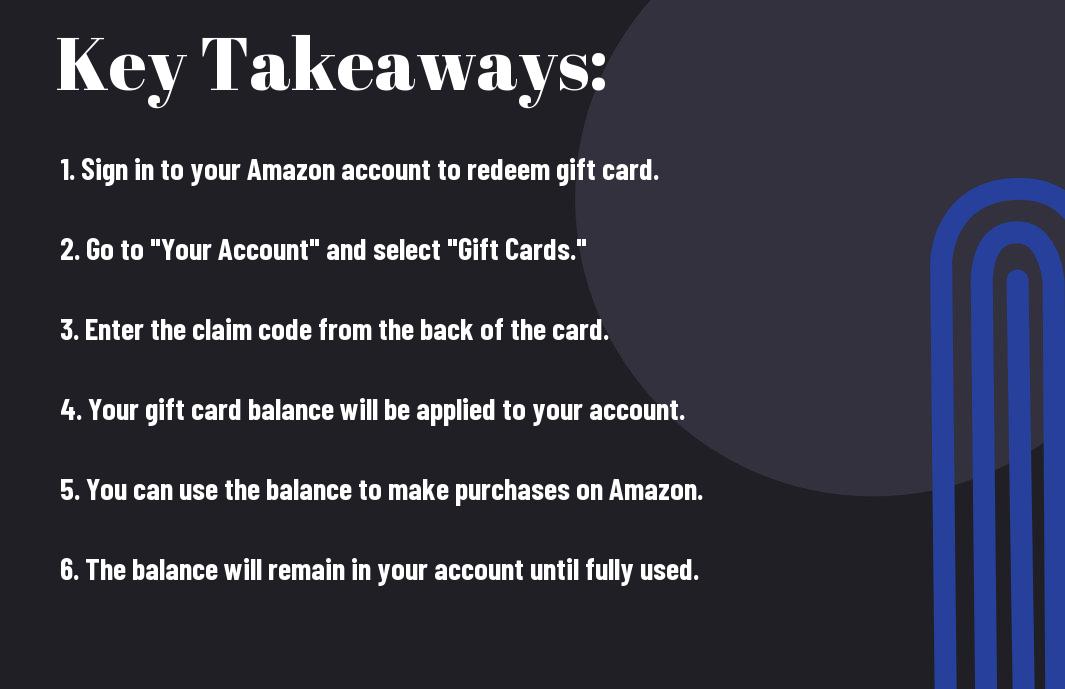
Perplexed about how to use your Amazon gift card on Amazon? Don’t worry, I’ve got you covered. First things first, you’ll need to sign in to your Amazon account. Once you’re logged in, go to “Your Account” and then click on “Gift cards and promotional codes.” Next, enter the claim code located on the back of your gift card. Click “Apply to your balance,” and voila! Your Amazon gift card has been successfully redeemed and added to your Amazon account. Now, when you make a purchase, the gift card balance will automatically be applied to your order. It’s as simple as that. One important thing to note is that Amazon gift cards do not have an expiration date, so you can use them whenever you want. This is a convenient way to shop and take advantage of Amazon’s vast selection of products. Happy shopping!
Key Takeaways:
- Go to Your Account: Access your Amazon account and navigate to the “Gift Cards” section to redeem your gift card.
- Enter Gift Card Code: Carefully enter the unique gift card code provided on the back of the card into the designated field.
- Click “Apply to Your Balance”: After entering the code, click on the “Apply to Your Balance” button to add the gift card value to your Amazon account.
- Verify Balance: Confirm that the gift card amount has been successfully added to your Amazon account balance before making a purchase.
- Use for Future Purchases: The amount added to your Amazon account can now be used to buy products or services on the Amazon website.
Understanding Amazon Gift Cards
As a frequent Amazon shopper, I often receive Amazon gift cards from friends and family. Amazon gift cards are a convenient way to shop on the platform without using your credit or debit card. These gift cards can be used to purchase a wide range of products, from electronics to clothing to books. If you’re new to using Amazon gift cards, it’s essential to understand how they work and how to redeem them. For a detailed guide on how to redeem a gift card on Amazon, you can visit Redeem a Gift Card – Amazon Customer Service.
Buying an Amazon Gift Card
If you’re looking to purchase an Amazon gift card for yourself or someone else, you can easily buy one online or at select retail locations. Simply choose the value of the gift card, add it to your cart, and complete the purchase. You can also personalize the gift card with a custom message for the recipient. Once the purchase is complete, the gift card will be sent to the recipient via email or delivered physically, depending on your selection.
Types of Amazon Gift Cards
There are two main types of Amazon gift cards: physical and digital. Physical gift cards are traditional cards that are sent through the mail or can be picked up at a retail store. Digital gift cards, on the other hand, are sent via email and can be instantly redeemed. Any unused balance on the gift card will remain in your Amazon account for future purchases. It’s important to note that Amazon gift cards do not expire, and they cannot be redeemed for cash.
| Physical Gift Cards | Digital Gift Cards |
|---|---|
| Can be delivered through mail or picked up at a store | Sent via email |
| No expiration date | No expiration date |
| Cannot be redeemed for cash | Cannot be redeemed for cash |
| Customizable with message | Customizable with message |
Redeeming Your Amazon Gift Card
Some of the most popular gift cards that people receive are from Amazon. But once you have received an Amazon gift card, you may be wondering how to use it on the website. The process of redeeming an Amazon gift card is relatively straightforward, and I will guide you through the steps to make the most of your gift card balance.
Adding Your Gift Card to Your Amazon Account
When you receive an Amazon gift card, the first step is to add it to your Amazon account. To do this, log in to your Amazon account and go to the “Your Account” section. From there, select “Gift Cards” and then click on the “Redeem a Gift Card” button. Enter the claim code on the back of your gift card, and the amount will be added to your Amazon account balance. This balance will be used automatically for future purchases on the website.
Using Your Gift Card Balance to Make a Purchase
Once your gift card balance has been added to your Amazon account, you can use it to make a purchase. During the checkout process, you will have the option to apply your gift card balance to the total amount due for your order. If the cost of your purchase exceeds your gift card balance, you can pay the remaining amount using a credit card or another payment method. Keep in mind that your Amazon gift card balance does not expire, so you can use it at any time to buy items on the website.
Managing Your Amazon Gift Card
Despite being a convenient and popular choice, many Amazon users are not aware of the different ways they can manage their Amazon gift cards. As a frequent Amazon shopper, I have learned several useful tips and tricks for maximizing the use of my gift cards. Understanding how to check your gift card balance and send Amazon gift cards to others can be incredibly valuable for getting the most out of your Amazon gift card experience.
Checking Your Gift Card Balance
One of the most important things to do when managing your Amazon gift card is to keep track of the balance. I always recommend checking your gift card balance regularly to avoid any unpleasant surprises at checkout. To check your balance, simply log into your Amazon account, go to the “Gift Cards” section, and enter your gift card code. You can also call the Amazon customer service hotline and inquire about your gift card balance. Keeping an eye on your balance ensures that you don’t overspend or miss out on using your gift card before it expires.
Sending Amazon Gift Cards to Others
Another useful feature of managing your Amazon gift card is the ability to send gift cards to others. Whether it’s for a birthday, holiday, or just to show appreciation, sending an Amazon gift card is a thoughtful gesture. You can easily send a gift card to someone by selecting the gift card design, entering the recipient’s email address, and choosing the amount. This is a great way to share the convenience and joy of using Amazon gift cards with your friends and family.
By staying on top of these management tips, you can ensure that you are making the most of your Amazon gift card experience. Keeping track of your balance and sharing the gift card love with others are important aspects of managing your Amazon gift card effectively.
Conclusion
So, now that you’ve learned how to redeem your Amazon gift card on Amazon, you can start enjoying your favorite products and services on the platform. By following these simple steps, you can easily apply your gift card balance to your purchases and take advantage of the many benefits that come with it. Whether you received the gift card as a present or purchased it for yourself, knowing how to use it effectively can enhance your online shopping experience. Remember to keep track of your gift card balance and make the most out of it with every purchase you make. Happy shopping!
FAQ – How to Use an Amazon Gift Card on Amazon – Redeeming Gift Cards
Q: How do I redeem an Amazon Gift Card on Amazon?
A: To redeem an Amazon Gift Card, log in to your Amazon account and navigate to “Your Account.” Under the “Gift Cards” section, select “Redeem a Gift Card.” Enter the claim code from your gift card and click “Apply to Your Account.” The funds will be added to your Amazon account balance for future purchases.
Q: Can I use an Amazon Gift Card to make a purchase on Amazon?
A: Yes, you can use an Amazon Gift Card to make purchases on Amazon. When you proceed to checkout, you will have the option to apply your Amazon Gift Card balance towards your purchase total.
Q: How can I check the balance of my Amazon Gift Card?
A: To check the balance of your Amazon Gift Card, log in to your Amazon account and go to the “Gift Cards” section under “Your Account.” Your current gift card balance will be displayed there.
Q: Can I use multiple Amazon Gift Cards to make a purchase?
A: Yes, you can use multiple Amazon Gift Cards to make a purchase. When you redeem each gift card, the funds will be added to your Amazon account balance, which can then be used towards your purchase total at checkout.
Q: What can I purchase with an Amazon Gift Card?
A: You can use an Amazon Gift Card to purchase a wide variety of products available on Amazon, including but not limited to electronics, books, clothing, and household items. Your gift card balance can be applied to any eligible items sold by Amazon.com.

-
 Entertainment2 years ago
Does The Rock Have a Twin Brother? Exploring Celebrity Family Facts
-
 Lifestyle2 years ago
How Long Does a Killer Whale Live – What's Their Average Lifespan?
-
 Lifestyle2 years ago
How Many Hairs Are on a Human Head? Understanding Hair Density
-
 Lifestyle2 years ago
What Is an Industrial Plant? Exploring Industrial Facilities
-
 Technology2 years ago
How Far Can a Human Eye See – What's the Maximum Range?
-
 Lifestyle2 years ago
North Carolina Education Lottery App – Playing Lottery Games on Mobile
-
 Technology2 years ago
How Many People Can Solve a Rubik's Cube – Is It a Common Skill?
-
 Technology2 years ago
Is Dr. Pepper a Coke Product – Who Manufactures It?